
Eight modules, one system
Everything CaterFlow does, module by module
Not eight apps you reconcile at the end of the month — one system, with a real screen and a real workflow behind every claim below.
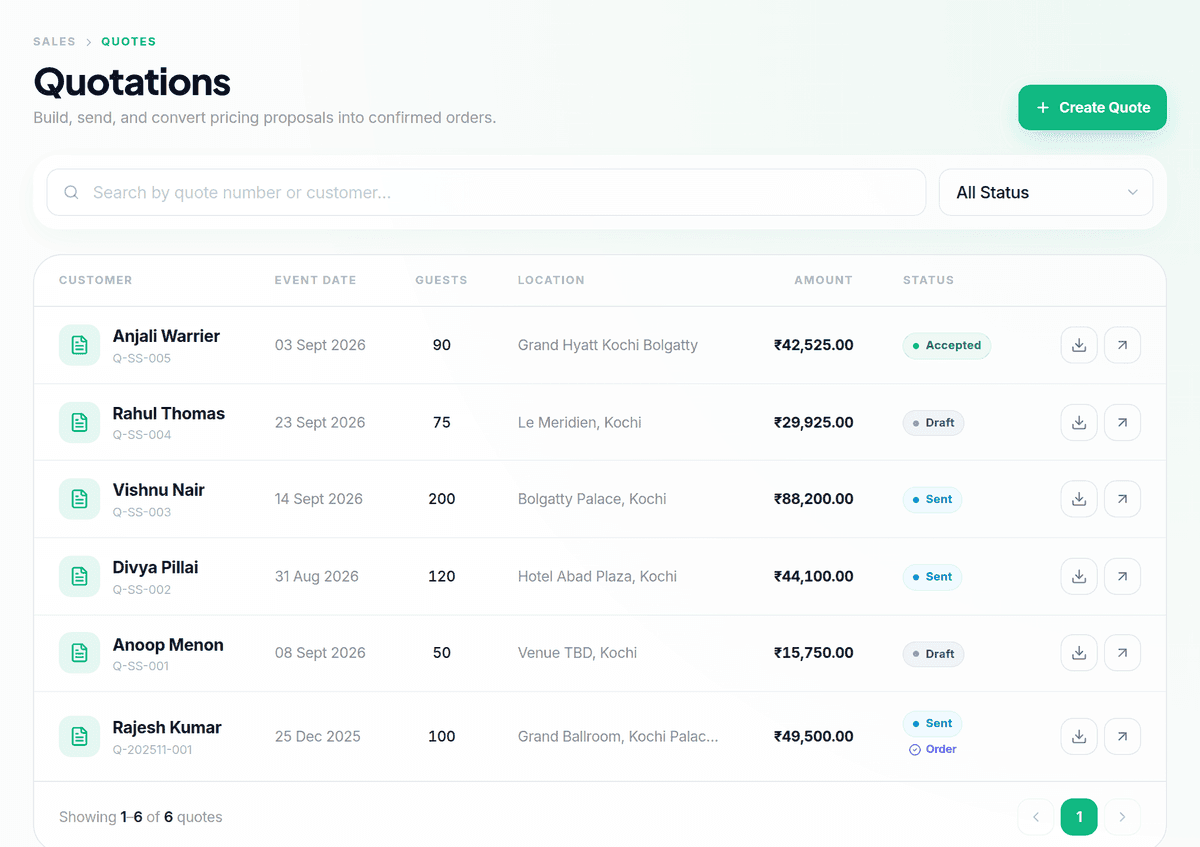
Sales
From enquiry to signed event
A lead pipeline, a quote builder and an event calendar that share one customer record.
- Lead pipeline with a full customer activity timeline
- GSTIN and billing details held against the customer
- Quote wizard with per-plate pricing and GST
- Quote lifecycle from draft through accepted or expired
- One-click conversion of an accepted quote into an event
- Event calendar with venue, guest count and crew
How you use it
- 1
Add the customer
Log contact details, GSTIN and the enquiry against one customer record.
- 2
Build the quote
Pick dishes from your menu library, set the guest count, and price it per plate.
- 3
Send it and track it
Send over WhatsApp or email from inside the app, and see delivery and read status.
- 4
Watch it become an event
An accepted quote converts automatically, with the menu, guest count and venue carried over.
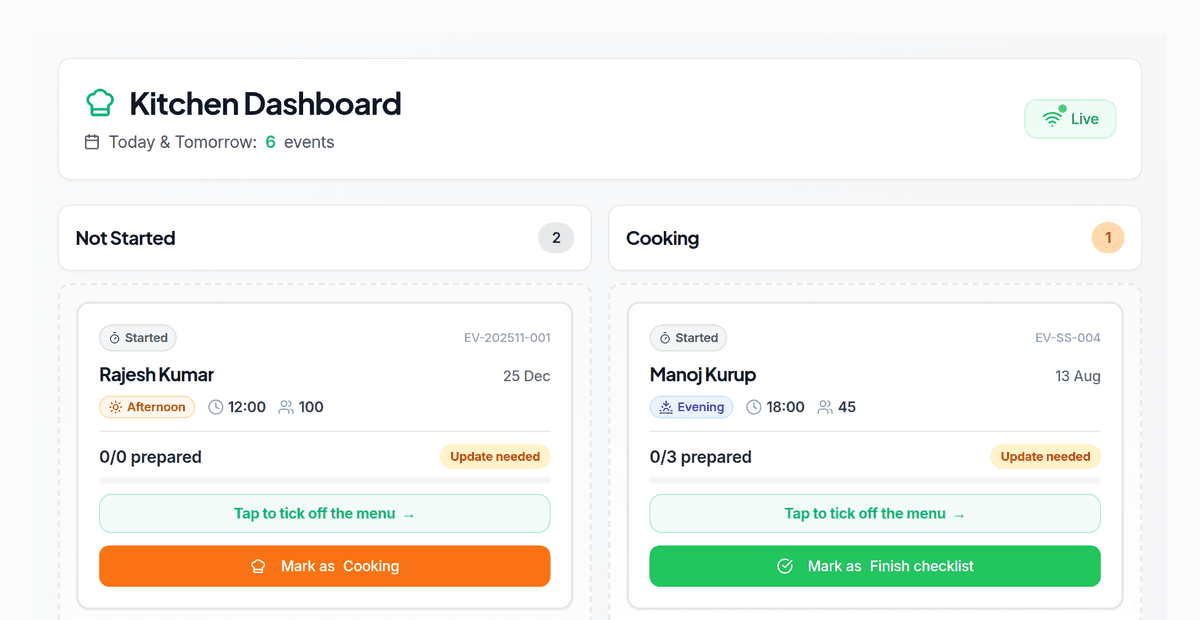
Kitchen
Menus, recipes and a tablet the kitchen can actually use
Your menu library, costed recipes, and a display built for a busy kitchen.
- Menu library across the full Indian catering catalog — starters, curries, live counters, chat and tea counters
- Recipe costing with margin visible per dish
- Tablet kitchen display with prep lists per event
- QA checklist with photo capture, and every dish ticked off before Ready
- Waste logging that writes back to stock
- Low-margin recipe alerts on the dashboard
How you use it
- 1
Cost your recipes
Build each recipe from your ingredients and see the margin on the dish as you go.
- 2
Check the kitchen tablet each morning
It shows the day's events with prep lists pulled from the menu.
- 3
Work the QA checklist
Staff tick off each dish with a photo before the event is marked Ready.
- 4
Log waste as it happens
A waste entry writes a stock transaction and shows up in the waste summary.
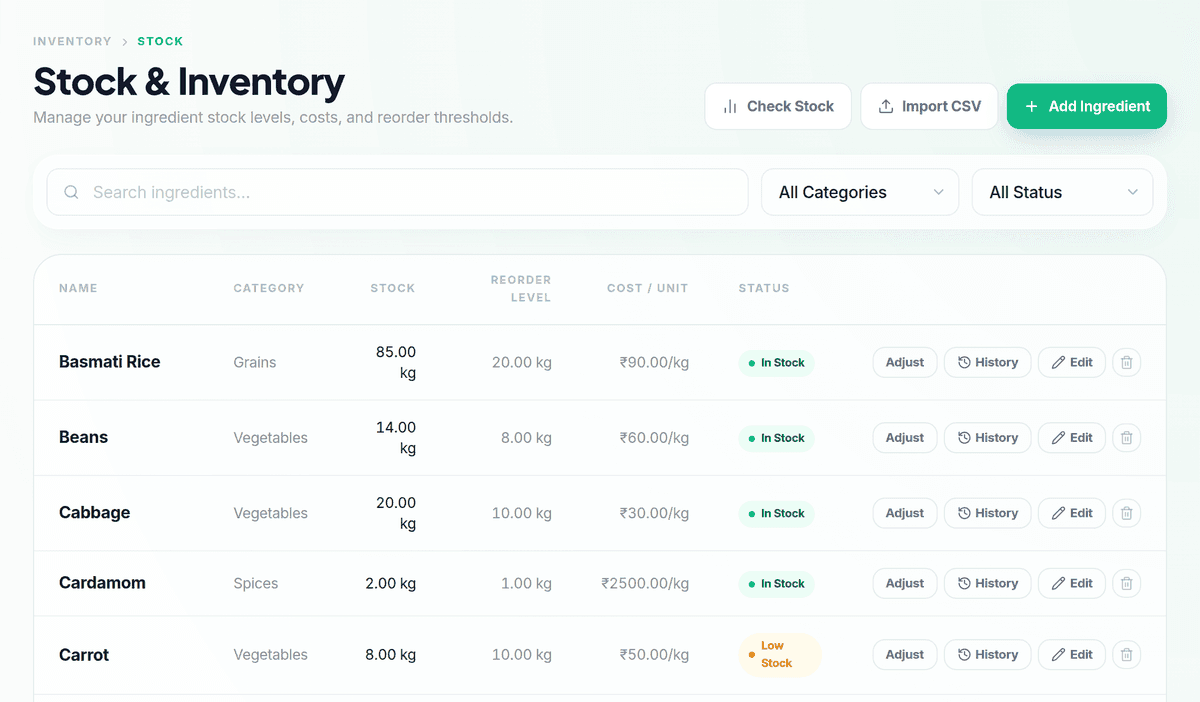
Inventory
Know what you hold, what it cost, and what you need next
A full stock ledger, vendor management, purchase orders and demand forecasting.
- Ingredient catalog by category — vegetables, meat, spices, dairy, grains, oil — in six units
- Live stock status driven by a per-ingredient reorder level, with low-stock alerts
- Complete stock ledger: every purchase, usage, waste and adjustment, costed
- Purchase orders end to end, from draft to received to paid and closed
- Vendor scorecards, comparison and poor-performance flags
- Demand forecasting from upcoming events, with accuracy tracking
- Create a purchase order straight from a forecast
- CSV import for bulk ingredient loading and a live stock-value summary
How you use it
- 1
Load your ingredient catalog
Import from CSV or add items as you go, each with a reorder level.
- 2
Raise a purchase order
Pick a vendor, add items and rates, and send it.
- 3
Receive stock in
Marking a PO received writes the stock transaction and updates levels.
- 4
Watch the low-stock alerts
Anything below its reorder level surfaces on the dashboard.
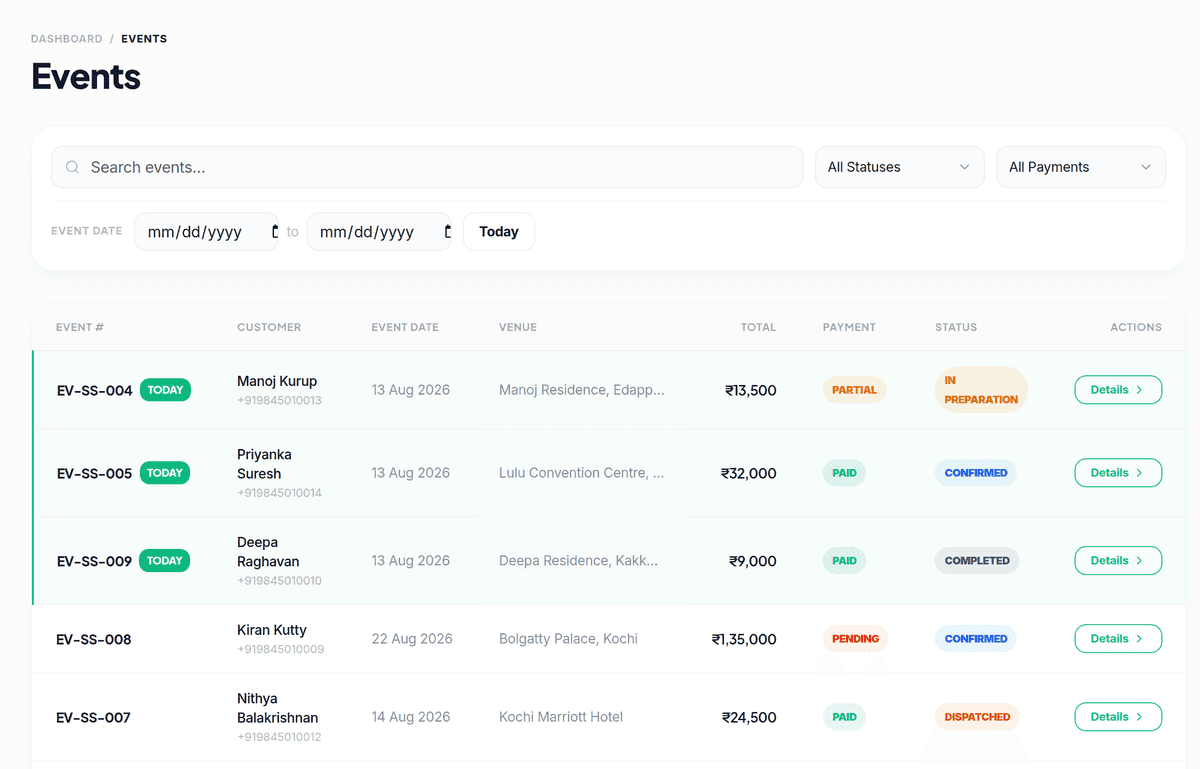
Delivery
Get it there, and prove you did
Driver assignment, a driver-facing app, and a tracked delivery with proof.
- Assign drivers to events and see their load
- Driver dashboard showing their assigned deliveries
- Tracked delivery legs from assigned through delivered
- Venue directions and map pin from the event record
- Proof-of-delivery photo capture on completion
How you use it
- 1
Assign a driver
Pick a driver for the event; they see the venue address and their load.
- 2
Track the trip
Status moves from picked up to in transit to delivered as the driver updates it.
- 3
Capture proof of delivery
A photo captured on completion attaches to the event record.
Finance
Receivables, payables, GST and the margin on every event
The money side, including the parts the tax office cares about.
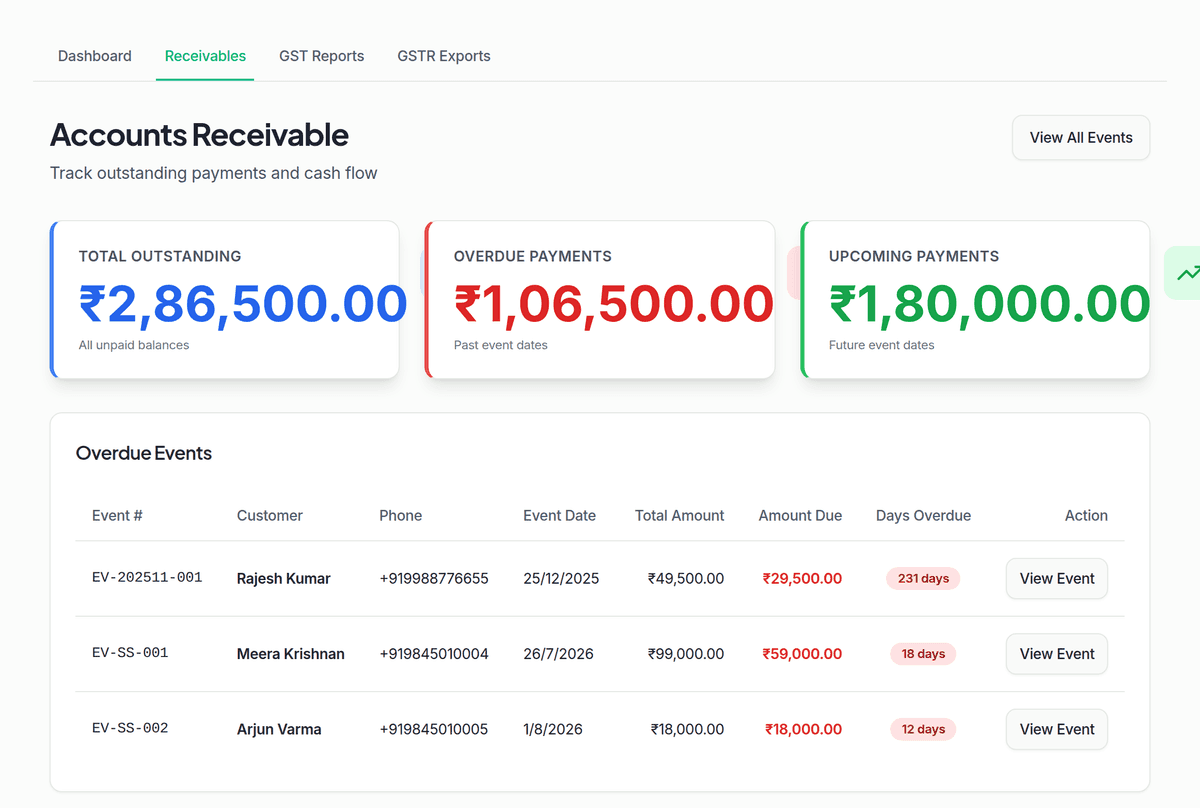
- Outstanding receivables with days-overdue tracking
- Record payments by cash, UPI, card, bank transfer, cheque or online
- Accounts payable against your vendors
- GST reporting with GSTR-1 and GSTR-3B exports
- Revenue and margin analytics per event
- Audit trail on every recorded payment
How you use it
- 1
Record a payment
Log cash, UPI, card, bank transfer, cheque or online payments against an event.
- 2
Track what's outstanding
Receivables show days-overdue so you know who to chase.
- 3
Pay your vendors
Record what you owe against each purchase order, with its own aging report.
- 4
File your GST
Generate GSTR-1 and GSTR-3B exports from your recorded invoices.
Team
Rosters, attendance, leave and payroll for catering staff
A full HR and payroll stack sized for a catering operation, not an office.
- Employee records with certifications and a skills matrix
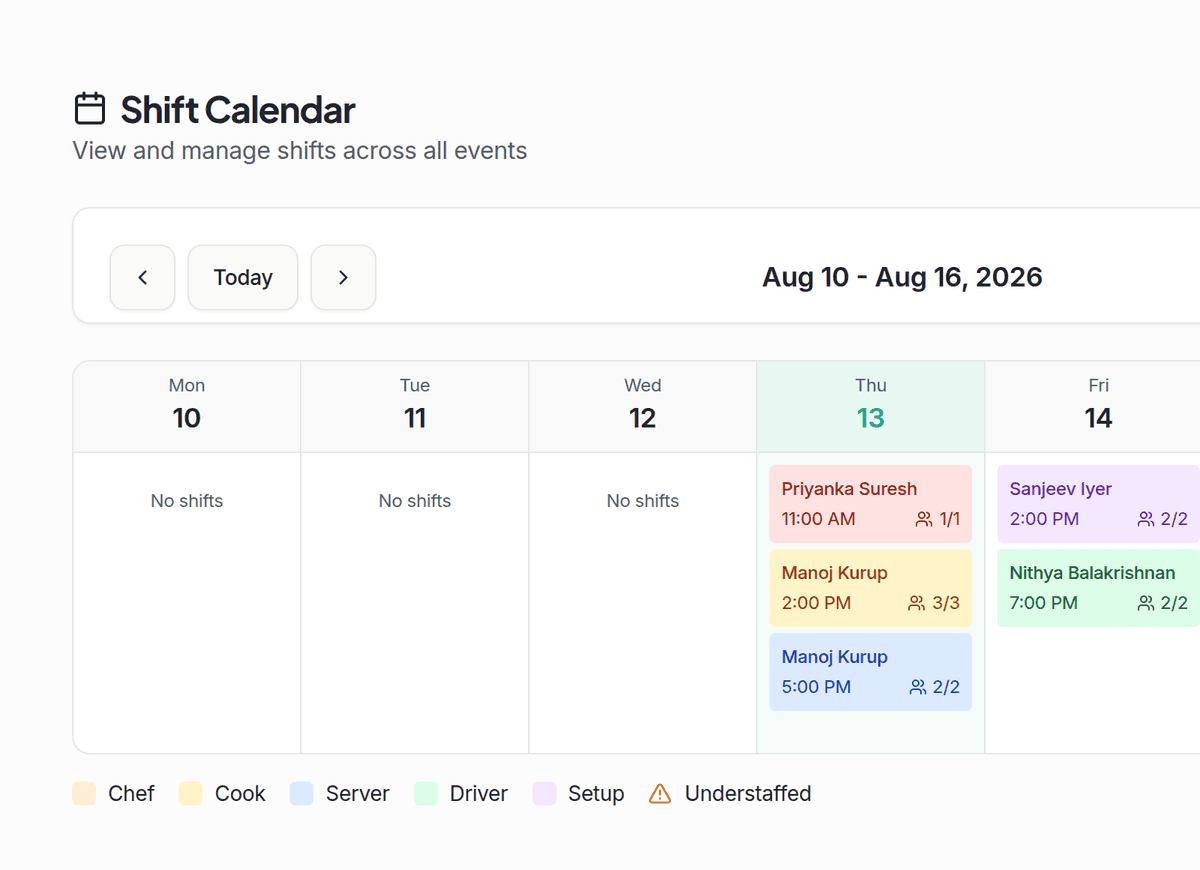
- Shift calendar with scheduling, rosters and shift swaps
- Attendance tracking — present, absent, late, left early, on leave
- Leave policies, balances, requests, approvals and encashment
- Salary structures, pay grades, overtime and bonus calculation
- Monthly payroll runs from draft to processed to paid
- Per-employee payslip PDFs and bank-transfer file generation
- Staff loans and performance reviews
How you use it
- 1
Build the shift calendar
Schedule shifts per event and assign employees, with availability and skills checked.
- 2
Track attendance
Staff clock in and out, or you mark it manually.
- 3
Run payroll
Calculate payslips from attendance, overtime and bonuses, then process the run.
- 4
Pay the team
Each processed run produces a payslip PDF and a bank-transfer file.
Website
A public website that feeds your pipeline
Built from the menu and photos already in your account, so nothing is entered twice.
- Three designed templates — Classic, Elegant and Modern
- Live preview before you publish anything
- Menu pulled from the same library the kitchen cooks from
- Photo gallery with captions and ordering
- Public quote-request form that captures leads into your pipeline
- Business details, service areas and event types surfaced for search
How you use it
- 1
Pick a template and fill in your details
Choose Classic, Elegant or Modern, and add your business details and service areas.
- 2
Publish it
Your site goes live at your subdomain, with the menu and photos already in your account.
- 3
Collect leads from it
A public quote-request form on your site feeds straight into your pipeline.
Website runs from the same account as everything else — no separate login, no separate data entry.
And the rest of it
Stop running events across six spreadsheets.
Start free, load your menu, and send your first quote today.
Social Media
Plan, write and publish your social calendar
Instagram, Facebook and YouTube scheduled from the same place you run the kitchen.
How you use it
Connect your accounts
Link Instagram, Facebook and YouTube once.
Write and schedule a post
Use an AI-assisted caption or a saved template, then schedule it.
Let it publish itself
Scheduled posts go out to each connected platform automatically.